Introduction
Anyone who has ever tried to set up a home office, a small business network, or even a modest server rack has run into the same quiet frustration: cables. Not the big, glamorous parts of a network setup — routers, switches, access points — but the humble patch cable that connects everything together. It’s easy to overlook until you’re staring at a tangle of mismatched colors and lengths, trying to figure out which cable goes where.
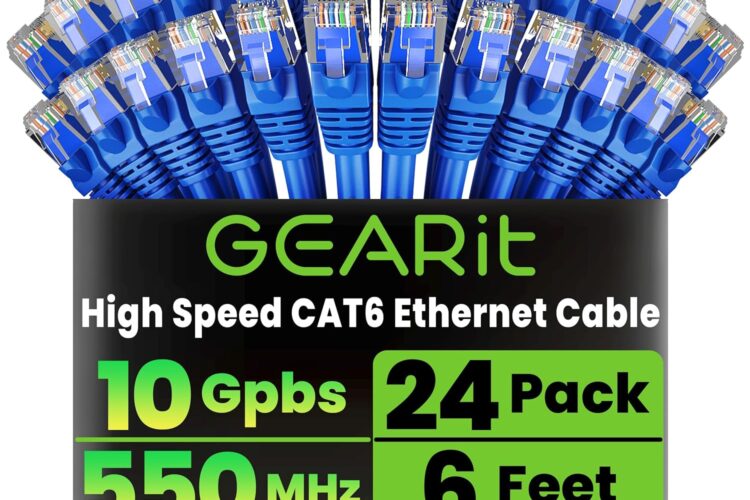
This is where a bulk pack of standardized Ethernet cables, like the GEARit Cat6 Patch Cables in a 24-pack of 6-foot blue cables, tends to catch the attention of people setting up or reorganizing a network. Whether you’re wiring a home office, managing a small server closet, running cables through a classroom, or simply replacing aging cords in a media cabinet, having a large quantity of identical, reliable cables on hand can simplify a project considerably.
In this article, we’ll walk through what Cat6 cabling generally offers, what to expect from a bulk pack like this one, how such cables are typically used, who might find this kind of purchase useful, and what to think about before adding a large quantity of networking cable to your setup. The goal here isn’t to declare this product the “best” of anything — it’s to give you the kind of grounded, practical information that helps you decide whether it fits your particular situation.
What Is Cat6 Cabling, and Why Does It Matter?
Before diving into the specifics of this particular product, it helps to understand the category it belongs to. “Cat6” refers to Category 6 cabling, a standard used in Ethernet networking. It’s one of several generations of twisted-pair cable standards (following Cat5 and Cat5e, and preceding Cat6a and Cat7) that define how data is transmitted over physical copper wiring.
Cat6 cables are generally built to support higher bandwidth and reduced electromagnetic interference compared to older Cat5e cables, thanks to tighter twists in the internal wire pairs and often improved shielding or insulation. In practical terms, this typically translates into support for gigabit speeds over standard cable runs, with the potential for higher throughput over shorter distances under the right conditions.
For most home and small office setups, Cat6 has become something of a baseline expectation — it’s a step up from older standards without requiring the extra cost or handling complexity that shielded Cat6a or Cat7 cables can involve. It’s a practical middle ground that suits many typical networking needs.
Overview of the GEARit Cat6 Patch Cables (24-Pack, 6 ft, Blue)
This particular product is a bulk set of 24 individual Ethernet patch cables, each measuring 6 feet in length, all in a matching blue color, and built to the Cat6 standard. Patch cables like these are short, pre-terminated cords — meaning they already have connectors (typically RJ45 plugs) crimped onto both ends, ready to plug directly into a router, switch, wall jack, patch panel, or device.
Rather than being a single length of bulk cable that you’d need to cut and terminate yourself, this is a ready-to-use set designed for immediate deployment. That distinction matters quite a bit depending on your project, which we’ll get into shortly.
Key Features
While specific technical details can vary slightly by batch or manufacturing run, patch cable packs like this one typically share a common set of defining characteristics:
1. Cat6 Rated Performance Being rated to the Cat6 standard generally means the cables are designed to handle higher data throughput and reduced crosstalk compared to older cable categories. This makes them suitable for typical home networking, streaming, gaming, and general office connectivity needs.
2. Uniform 6-Foot Length Every cable in the pack is the same length. This uniformity is often more valuable than it initially sounds — when you’re wiring a rack, a patch panel, or a row of devices, having cables of identical length creates a cleaner, more organized, and more predictable layout. It also means less excess cable to coil, tuck away, or manage.
3. Consistent Blue Coloring All 24 cables share the same blue color. Color-consistent cabling is often used in professional and semi-professional settings as a way to visually distinguish one type of connection from another (for example, using blue for standard data lines and a different color for VoIP, security cameras, or a separate VLAN).
4. Pre-Terminated RJ45 Connectors Each cable comes with connectors already attached on both ends, so there’s no need for a crimping tool, cable tester, or termination expertise. This is a meaningful convenience factor, especially for people who aren’t networking professionals.
5. Bulk Quantity With 24 cables in a single pack, this product is clearly aimed at situations where you need more than just one or two cords — think classrooms, server rooms, offices with multiple workstations, or home setups with many connected devices (smart TVs, gaming consoles, desktops, printers, security systems, and so on).
6. Stranded or Solid Core Construction Most patch cables in this category use stranded copper conductors, which tend to be more flexible and better suited for repeated bending and everyday patch use, as opposed to solid-core cable, which is generally used for longer, fixed in-wall runs.
How It Can Be Used
A 24-pack of short Ethernet cables opens up a fairly wide range of practical applications. Here are some of the more common scenarios where a bulk set like this tends to be useful:
Home Networking Overhauls
If you’re moving into a new home, finishing a basement, or simply trying to reduce reliance on Wi-Fi for certain devices, having a stock of Ethernet cables on hand makes it easy to hardwire smart TVs, streaming boxes, gaming consoles, desktop computers, and network-attached storage devices. Wired connections often provide more consistent speeds and lower latency than wireless connections, particularly in homes with a lot of wireless interference or many connected devices competing for bandwidth.
Small Office and Business Setups
Offices with multiple desks, VoIP phones, printers, and shared workstations often need several identical cables to keep the wiring clean and functional. A uniform color and length across the whole office can also make troubleshooting easier down the line — if every desk uses the same blue 6-foot cable, it becomes simple to spot when someone has swapped in a different cord, which can help with diagnosing connectivity issues.
Server Rooms and Patch Panels
In server racks or wiring closets, patch cables are used to connect switches, patch panels, and routers in tight, organized runs. Because rack equipment is often mounted close together, short 6-foot cables are a practical length — long enough to reach across a rack comfortably, but short enough to avoid unnecessary slack and cable clutter.
Classrooms and Computer Labs
Educational environments with rows of desktop computers often need a large number of identical cables. A 24-pack lines up conveniently with a classroom or lab that might have around that many workstations, reducing the need to order in several smaller batches.
Home Labs and Hobbyist Networking
For hobbyists building home labs, testing network configurations, or experimenting with VLANs, subnets, and segmented networks, having a color-coded, bulk supply of cables is genuinely useful. Blue cables might be designated for one subnet, while other colors handle different segments, making physical tracing far easier.
Replacing Aging or Damaged Cables
Over time, Ethernet cables can degrade — connectors loosen, plastic tabs snap off, or cables get crimped and damaged from being stepped on or pulled at odd angles. A bulk pack is a practical way to have replacements ready without needing to make repeated small purchases.
Who It May Be Suitable For
Given the nature of this product — a large quantity of short, matching-length cables — it tends to appeal to a fairly specific set of users:
- IT professionals and network technicians who regularly wire offices, racks, or patch panels and want a dependable stock of short, uniform cables.
- Small business owners setting up or expanding office connectivity for several desks or devices at once.
- Home network enthusiasts who are hardwiring multiple rooms or devices and want consistent quality and appearance across their setup.
- Teachers, schools, and training centers outfitting a computer lab or classroom with several workstations.
- Landlords or property managers wiring multiple units or common areas with structured cabling.
- Hobbyists and homelab builders experimenting with networking equipment, virtualization, or segmented home networks.
On the other hand, if you only need one or two cables — say, to connect a single router to a single computer — a 24-pack is likely to be far more than necessary, and a single cable purchase would be a more sensible fit.
Important Things to Consider
No product is a perfect fit for every situation, and bulk cable packs come with a few practical considerations worth thinking through before purchasing.
Cable Length Suitability
At 6 feet, these cables are well suited for short-distance connections — desk to wall jack, switch to patch panel, or device to nearby router. If your project requires longer runs (for example, connecting a router in one room to a device in another room several feet away), you’ll want to measure your specific distances first, since 6-foot cables won’t stretch beyond their length no matter how the network is arranged.
Indoor Use Only
Standard patch cables like these are generally designed for indoor use. They are not typically rated for outdoor exposure, direct burial, or extended contact with moisture and temperature extremes. If you need to run cable outdoors or underground, a different, outdoor-rated cable type would be more appropriate.
Stranded vs. Solid Core Differences
Patch cables using stranded copper are great for flexibility and everyday connections but are generally not intended for long, permanent in-wall runs — that job is usually better handled by solid-core bulk cable, which is a separate category of product entirely. If your project involves running cable inside walls across a house or building, it’s worth researching that distinction further.
Connector Durability Over Time
RJ45 connectors, like any small plastic components with a locking tab, can be prone to wear if repeatedly plugged, unplugged, or if the tab is snagged and broken. Being mindful of how cables are routed and handled can help extend their usable life.
Quantity vs. Actual Need
Because this is a 24-pack, it’s worth realistically assessing how many cables your project actually calls for. For smaller households or single-device setups, a smaller pack size or a single cable would likely be more cost-efficient and less wasteful than a large bulk pack.
Color Coordination Planning
If you’re using color-coding as part of a structured cabling plan (for example, reserving blue for one type of connection), it helps to decide on that system in advance, so that all 24 cables get used in a way that keeps your network organized rather than just uniformly blue without any functional distinction.
A General Comparison of Ethernet Cable Categories
To put Cat6 cabling in context, it helps to briefly compare it to other common categories of Ethernet cable, without singling out any particular brand or product as superior:
Cat5e is an older but still commonly used standard. It generally supports gigabit speeds over typical cable lengths but has less effective handling of interference compared to Cat6. It’s often more budget-friendly and remains widely used in many existing installations.
Cat6 improves on Cat5e with tighter internal twisting and generally better interference resistance, allowing for higher potential bandwidth and more stable performance, particularly over shorter distances. It’s a common choice for new installations that want a bit more headroom than Cat5e offers.
Cat6a builds further on Cat6, typically supporting higher bandwidth over longer distances and often including more robust shielding. It tends to be a thicker, less flexible cable, and is often chosen for environments with demanding performance requirements or significant electrical interference.
Cat7 and Cat8 are higher-end standards generally reserved for specialized or high-performance environments, such as data centers, and are less commonly needed for typical home or small office networking.
In general terms, Cat6 sits in a practical middle zone — offering a meaningful step up from Cat5e without the added bulk, cost, or handling considerations that come with Cat6a and above. For most household and small office networking needs, Cat6 tends to be considered a reasonably future-conscious, balanced choice.
Frequently Asked Questions
Is Cat6 cable backward compatible with older devices and routers? Generally, yes. Cat6 cables typically work with devices designed for older standards like Cat5 or Cat5e, though the connection speed will be limited by the slowest component in the chain — whether that’s the cable, the router, the switch, or the device itself.
Can these cables be used outdoors? Standard indoor patch cables like this one are not typically designed for outdoor use. Outdoor networking projects usually call for cable specifically rated for UV resistance and moisture exposure.
Do I need any tools to use these cables? No. Since the cables come pre-terminated with connectors already attached, they’re generally ready to plug in without any crimping tools or technical setup.
What’s the difference between a patch cable and bulk cable? Patch cables are pre-cut, pre-terminated cords meant for direct connections between devices, panels, or wall jacks. Bulk cable is sold as one continuous spool, meant to be cut to custom lengths and terminated separately — usually for in-wall or long-distance runs.
Will 24 cables be too many for a typical household? It depends on the household. A larger home with multiple hardwired devices — smart TVs, computers, consoles, printers, and networking equipment — might reasonably use a good portion of a 24-pack over time. For a single connection, though, a smaller pack or an individual cable is generally a more practical fit.
Does the color of the cable affect performance? No, cable color is purely cosmetic and organizational. Performance is determined by the cable’s category rating and build quality, not its color.
Can Cat6 cables support 4K or 8K streaming devices? Generally speaking, Cat6 cabling should comfortably handle the bandwidth needs of most home streaming setups, including high-resolution video, though actual performance also depends on your router, modem, and internet service.
Conclusion
A bulk pack of Cat6 patch cables, like the GEARit 24-pack of 6-foot blue cables, fills a fairly specific but genuinely useful role: providing a large, consistent supply of ready-to-use networking cables for situations that call for more than just one or two connections. Whether that’s a home office with several hardwired devices, a small business network, a classroom computer lab, or a server rack that needs organized, color-coded patch connections, having a uniform set of cables on hand can simplify both the initial setup and any future troubleshooting.
As with any networking purchase, it’s worth thinking through your specific use case — the distances involved, the number of devices you’re connecting, whether you need indoor or outdoor-rated cable, and how much quantity you genuinely need — before deciding whether a large bulk pack like this is the right fit. For projects that call for multiple identical, short-length Ethernet connections, this type of product is designed to meet that particular need in a straightforward, practical way.